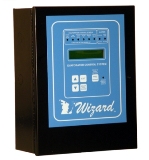
The Wizard WDC / WEC-1ZONE Defrost Control System is designed to control the room or zone temperatures and the evaporator operations for large ammonia and halocarbon refrigeration systems. The WDC performs the functions of the following independent control systems:
Evaporator Valve Group Status Monitor
Multi-Function Defrost Clock
Temperature Control
Temperature Monitoring and Alarming
Alarm System
Evaporator Valve Group Status Monitor
The WDC has a series of status LEDs on the front panel that provide an easy method to determine the status of the Evaporator Valves and contactors.
Defrost Control
The WDC is an electronic control and time clock. The time clock can operate up to 12 defrost cycles per day with three separate defrost schedules as well as manual defrost. The defrost can be either gas, electric, water or off-time defrost. The WDC will cycle all valves necessary to perform a defrost of some of the more complex refrigeration systems.
During a defrost cycle the WDC will sequence through the following cycles as required:
| Hot Gas Defrost |
Electric Defrost |
Water Defrost |
Off-time Defrost |
- Pump Down Cycle
- Soft Gas Cycle
- Hot Gas Cycle
- Drip Cycle
- Equalizer Cycle
- Fan Start Delay
|
- Pump Down Cycle
- Pre-Heat Cycle
- Main Electric Defrost Cycle
- Drip Cycle
- Equalizer Cycle
- Fan Start Delay
|
- Pump Down Cycle
- Water Stage1 Cycle
- Main Water Defrost Cycle
|
|
Defrost Features
Daily Schedules. The control has three unique defrost schedules: Weekday (Monday - Friday), Saturday and Sunday.
Automatically adjusts time for daylight savings. The WDC can be set to automatically change the clock for day light savings or can be set not to change if the facility is in states where daylight savings is not observed. The Daylight Savings Schedule is set through 2020.
Can schedule up to 12 defrost cycles per day. The WDC can be programmed to run up to 12 defrost cycles per day. The control will automatically space out each cycle evenly or allow the user to program the start times.
Gas, Electric, Water, or Air defrosts.The WDC can operate defrost circuits that are either Off-time, Hot Gas, or Electric. Steps that are not used can be set to 0 minutes, and the controller will skip over them to the next step.
Demand Defrost - Liquid Line Solenoid Feed Time. The WDC can initiate its defrost cycles base upon the total liquid feed time. This option can be used to activate the system only when the "Number of Cycles per Day" set to zero. The liquid demand delay can range from 0 to 24 hours, in fifteen minute increments.
Demand Defrost - Remote Activation The WDC has a digital input that forces the control into the defrost cycle. This input can be used to activate the system for an additional defrost cycle, or with the "Number of Cycles per Day" set to zero, the input can be wired to a gang defrost clock and a number of WDCs can be staged evenly or to a frost sensor and the WDC will defrost only when necessary.
Defrost Termination. Any one of the following functions will terminate the Main Defrost Cycle:
Clicks-On Thermodisk (Dry Contact). By providing a closure across the Defrost Termination input terminal, the WDC will terminate the Defrost Cycle. The Clicks-On should be mounted on the coil and should have a temperature rating corresponding to cleared coil temperature.
Suction Pressure Switch (Dry Contact). By providing a closure across the Defrost Termination input terminal, the WDC will terminate the Defrost Cycle. The pressure switch should be mounted on the suction line and should be set to a suction pressure corresponding to a cleared coil.
Termination Temperature Sensor. The WDC will monitor a temperature sensor mounted in the coil. The WDC will terminate the Defrost Cycle when the temperature exceeds a selectable Termination Setpoint.
Time. If the WDC does not detect a termination signal, the Main Defrost Cycle will terminate at the end of the programmed cycle duration.
Defrost Termination Log. The WDC has a "Defrost Log" that records the duration of the previous 10 defrost cycle Defrost stages. This log can be used to determine whether the current defrost setup is operating efficiently or whether adjustments need to be made
Temperature Control
Each WDC comes with a temperature sensor for monitoring or controlling the temperature in the refrigerated room. The control monitors for both high and low alarms each having its own programmed delay when programmed. The WDC will maintain the space temperature by cycling the LLS based upon a Temperature Setpoint and a plus/minus differential. The WDC will open the LLS when the temperature reaches T = Setpoint minus Differential Value. The WDC will close the LLS when the temperature reaches T = Setpoint plus Differential Value.
Temperature Control Setback -- The WDC allows the user to set a setback schedule, where the control will operate the temperature control functions at a higher setpoint during a specified time period. The setback schedule has a Monday - Friday, a Saturday, and a Sunday schedule.
Fan Cycling -- The WDC can cycle the evaporator fans once the temperature within the space is met. The WDC will also restart the fans after a setable delay to prevent stratification of the air.
Temperature Alarming
The WDC can monitor three independent temperature sensors, the Temperature Control Sensor, the Defrost Termination Sensor, and an Auxiliary Temperature Sensor.
Temperature Control Sensor -- This sensor consists of the the sensor used by the WDC for temperature control. All alarming is disabled during defrost. Once the WDC controller returns to normal refrigeration, the alarm delays will begin as if the sensor has just exceeded the alarm conditions.
Auxiliary Temperature Sensor -- This sensor is an additional temperature sensor that is monitored and logged, it does not control any WDC processes other than alarming. The user can choose whether the alarms are disabled during defrost or if the alarms are active during defrost.
Defrost Termination Sensor -- This sensor consists of the sensor used by the WDC to terminate the defrost cycle based upon the coil temperature. Should this temperature read above the setpoint level of the termination setpoint for over 30 minutes, the WDC will activate its systems alarms.
The WDC will activate its "System Alarm" relays when the space temperature exceeds the Hi Temp Alarm Limit for a duration longer than the Hi Alarm Delay or when the space temperature goes below the Lo Temp Alarm Limit for a duration longer than the Lo Alarm Delay. The WDC will activate the System Alarm Relay based upon the following alarm conditions:
High Alarm. The space temperature must exceed the High Alarm Limit for a time period longer than the Hi Alarm delay. This function shall activate the control's "System Alarm Relay 2".
Low Alarm. The space temperature must be below the Low Alarm Limit for a time period longer than the Low Alarm delay. This function shall activate the control's "System Alarm Relay 1".
Termination Temperature High Alarm. The WDC will activate alarms if the termination Click-On or the Termination Temperature does not recover within 30 minutes. This function shall activate the control's "System Alarm Relay 2".
Remote Communications
GenCom Communications allows the computer operator to access the controllers within a facility via a PC. All control programming and logging functions are accessible and can be set or changed from the computer. The user can view all text and data logs, make programming changes to the controller, initiate defrost cycles, and investigate alarm conditions.